Showing posts with label YAHOO MESSENGER HACKS. Show all posts

Friday, October 15, 2010

how does yahoo booter works

Yahoo messenger can get into yahoo chat, but in reality, it’s a seperate service…

Yahoo Messenger’s server has a Buffer, this buffer is actually 128k not the 512k.

When the attacker sends multiple packets to you, what you don’t get from the server gets stored in a buffer, in comes a chat packet, the client grabs it, in comes 5 chat packets, you grab the first 3 packets, 2 are left behind on yahoo’s server, you then grab the 2 packets and then the buffer is back to empty.


Actually the booter sends 1k’s worth in 1 packet of PM (instant messaging packets) but instead of sending the 1 packet, the booter builds up 10 pm/im packets.

Then you send it to yahoo 10 loops packets of PMs @ 1k each = 80k in 1 load to yahoo then the booter sends it again, 160k.

Now if you can send 128k’s worth of data, pm packets, chat packets, anything you like to the other user BEFORE the user can get the data out, yahoo will simply disconnect them over 128k why?

Most Probably because the server is instructed to disconnect idle users or users who are no longer online, what’s the point of Keeping someone in yahoo chat if they are not getting the data people are sending them, after 40 minutes of a client sending data yahoo goes, we’ve buffered 128k, the user aint there, kick him…!

In Short, Yahoo Messenger Would Crash if it got anything more than 128k.

Also the connection protocols YMSG and Chat2 which is also a factor. YChat was harder to boot for the simple fact that it lacked in features compared to YMSG.
This is also why YMSG is easier to boot then Chat2. The more features the more ways you can be booted.

Yes there are ways to prevent from being booted

Wednesday, September 29, 2010

Creating IM Bot

This quick tutorial will show you how to develop your own functional IM bot that works with Google Talk, Yahoo! Messenger, Windows Live and all other popular instant messaging clients.
To get started, all you need to know are some very basic programming skills (any language would do) and web space to host your “bot”.


If you like to write a personal IM bot, just follow these simple steps:-
Step 1: Go to www.imified.com and register a new account with a bot.
Step 2: Now it’s time to create a bot which is actually a simple script that resides on your public web server.
It could be in PHP, Perl, Python or any other language.
Example Hello World bot:
The example below illustrates just how easy it is to create a bot.
This example is coded in PHP.
<?php
switch ($_REQUEST['step']) {
case 1:
echo "Hi, what's your name?";
break;
case 2:
echo "Hi " . $_REQUEST['value1'] . ", where do you live?";
break;
case 3:
echo "Well, welcome to this hello world bot, " . $_REQUEST['value1'] . "<br>from " . $_REQUEST['value2'] . ".<reset>";
break;
}
?>
Step 3: Once your script is ready, put it somewhere on your web server and copy the full URL to the clipboard.
Step 4: Now login to your imified account, paste the script URL

Step 5: Add that im bot your friends list. That’s it.
This is a very basic bot but the possibilities are endless.

Friday, April 16, 2010

Change the Title of Yahoo Messenger

Here’s how you change the title text that appears at the top of the Messenger window. By default, this is “Yahoo! Messenger”, followed by your status. Simply edit the ymsgr.ini file, which you will find in the same folder as the Messenger program, in your Program Files folder. Locate the file and open it in Notepad. Then, at the end, add the following:


[APP TITLE]

caption=YOUR TEXT


Here, “YOUR TEXT” is whatever you want in the title bar. Save the file and close Messenger. When you restart it you will see your text in the title bar.

Hacking Yahoo Messenger

This tutorial will tell you how to hack yahoo messenger while you are engaged in chatting with some person.While you are chatting through yahoo messenger, Yahoo will hide the IP addresses of all the computers that are connected through the yahoo messenger application to the chat room.So it is not possible to directly find out the IP of the person you want to hack.Then how to get the IP address? Yes it is still possible to hack the IP address during the Yahoo messenger chat.The procedure to Hack Yahoo messenger is discussed in detail below.


While you are chatting via yahoo messenger the communication between you and the person you want to hack, takes place indirectly via Yahoo server and not directly.It is not possible to hack Yahoo messenger directly to get the IP address.So to hack his IP, you must establish a direct communication with him.So,how to do this? It’s easy.Just start chatting with some one via Yahoo messenger.During the process of chatting send him a big file.Now the file transfer takes place directly between your computer and the victim’s computer(via yahoo messenger application).So now, you are ready to go. Here’s the step-by-step process to hack Yahoo messenger and get the IP address of the person .


■Goto the COMMAND PROMPT (START>>>RUN>>>Type CMD).

■Here Type “netstat -n” (without quotes).

NOTE: If you are new to “netstat” and other IP related commands refer this tutorial:Windows XP IP Utilities


■The pic given below shows netstat results of my computer.I was not chatting when i took this pic and hence it looks modified.


■Here local address is your own IP and the foreign address is the IP address of the recipient with whom you are connected via yahoo messenger (There may be multiple recipients and hence multiple foreign addresses).

■Now send him the file.

■Check the output by typing the command “netstat -n” (without quotes).

■Assume the output is something like this.


TCP 127.0.0.10:5101 124.55.23.11:1246 ESTABLISHED


Here 124.55.23.11 is the IP address of the person with whom you are chatting and 1246 is the port number where connection is established.That’s It! You have now hacked Yahoo messenger to get his IP address.


Once you hack Yahoo messenger and get his IP address you can use any of the Remote Administration tools or perform NETBIOS HACKING.Refer this tutorial on Netbios Hacking.


NOTE: Some times there are chances where in the file transfer gets encrypted (takes place via yahoo server itself).So in this case the above hack may fail to work.

Tuesday, April 13, 2010

Chat without Yahoo Messenger or Gtalk

Can we chat without Yahoo messenger? Most of us are familiar with the most widely used applications such as Yahoo messenger and Gtalk to carry out chatting with our friends.But here I’ll show how to chat without Yahoo messenger or Gtalk.As we all know the information we exchange with their servers(Yahoo or Gtalk) are recorded and stored along with the corresponding IP addresses.This may hurt our privacy since all the information we exchange while chatting has to pass through a third party server.


Moreover if the matter is highly confidential, then it is necessary to have a totally private chat where the messages are exchanged only between the people involved in the chat and not with any other third party servers.At these situations, it is better to chat without Yahoo messenger.

So, how to carry out a private chat without Yahoo messenger or Gtalk?

For this purpose there exists many softwares that support’s you to host a web-based chat system without any additional software or services.So with these softwares the exchange of messages takes place directly between the two persons engaging in the chat and will not pass through any other third party server.This ensures 100% privacy and eliminates the desperate need to chat with Yahoo messenger.

One of my favorite program for private chat is Easy Chat Server
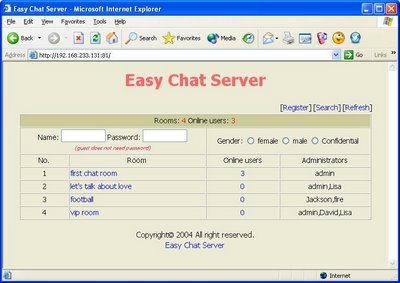
Easy Chat Server is a Windows program that allows you to host a web-based chat system without any additional software or services. Unlike other chat server, you do not need to install Java. It allows you to build one or more web-based chat rooms on your machine, and provides advanced chat functionalities aiming to offer discussion space for your users, customers and partners.

Here are some of the screenshots of Easy Chat Server.


Key Features of Easy Chat Server:

■Easy to use, Simple installation that will have you up and running in minutes.

■128-Bit Security Socket Layer(SSL) support. support for server level certificate creation.

■Instantly runs a complete chat server on your PCs – does not need to install any Web Server.

■Supports full private messaging and One to One private chat.

■Support of images, smileys, avatar icons.

■Full chat and access logs are available within the chat server.

■Have a built-in IP Filter, supports banning/unbanning IP address, securely.

■Multiple styles available for the user to customize rooms.

■Unlimited rooms and users, no any annual, per-user, or maintenance fees.

■No spyware, adware or other unwanted extra programs.